
Configure table views
A table view presents a spreadsheet-like summary of model elements: each row is an element selected by the view, and each column renders one aspect of it. This page builds a small requirements table step by step, touching every concept along the way; the pages under Learn more cover each one in depth.
Take a small model with two requirement definitions, each with an ID, documentation, and a subject:
package ExampleModel {
    part def Drone {
        doc /* A quadcopter delivery drone. */
    }
    part def Battery {
        doc /* A rechargeable power source. */
    }

    requirement def <'REQ-001'> MaxAltitude {
        doc /* The drone shall not exceed an altitude of 500 m. */
        subject drone : Drone;
    }
    requirement def <'REQ-002'> BatteryEndurance {
        doc /* The battery shall sustain 30 minutes of flight. */
        subject battery : Battery;
    }
}
Select the rows
The table view is itself a SysML element, written in the same workspace. Its
expose statement casts a wide net over the model, and filter narrows the catch
by type:
package MyViews {
    private import SysideViews::*;

    view myRequirementsTable : TVD::TableView {
        expose ExampleModel::*;
        filter hastype SysML::RequirementDefinition;
    }
}
Everything directly under ExampleModel is exposed, and only the requirement
definitions survive the filter: MaxAltitude and BatteryEndurance become the two
rows (see Expose and filter). A set of boolean attributes
refines what the selection collects, such as whether abstract definitions are
included (see ContentView attributes).
Add a column
Each child view subsetting columnViews becomes one column, and its declared name
becomes the column header, exactly as written. This column shows each requirement’s
ID:
view ID :> columnViews {
    attribute :>> featureRepresentation :> ColRep::declaredShortName;
}
The featureRepresentation attribute selects what aspect of the row element the
cells render: here the declared short name, which is where a requirement ID lives.
Further columns can render other aspects of the same row element by picking
different representations, here the declared name and the documentation body:
view Name :> columnViews {
    attribute :>> featureRepresentation :> ColRep::declaredName;
}
view Doc :> columnViews {
    attribute :>> featureRepresentation :> ColRep::documentation;
}
The full catalogue of representations spans names, documentation, attribute values, and more (see Representations). Some representations are writable, making their cells editable straight from the table (see Editable representations).
The finished table
package MyViews {
private import SysideViews::*;
view myRequirementsTable : TVD::TableView {
expose ExampleModel::*;
filter hastype SysML::RequirementDefinition;
view ID :> columnViews {
attribute :>> featureRepresentation :> ColRep::declaredShortName;
}
view Name :> columnViews {
attribute :>> featureRepresentation :> ColRep::declaredName;
}
view Doc :> columnViews {
attribute :>> featureRepresentation :> ColRep::documentation;
}
view 'Subject Name' :> columnViews {
    :>> columnFeature = Subject(baseViewElement);
    attribute :>> featureRepresentation :> ColRep::name;
}
view 'Subject Doc' :> columnViews {
    :>> columnFeature = DefinitionsFirst(Subject(baseViewElement));
    attribute :>> featureRepresentation :> ColRep::documentation;
}
}
}
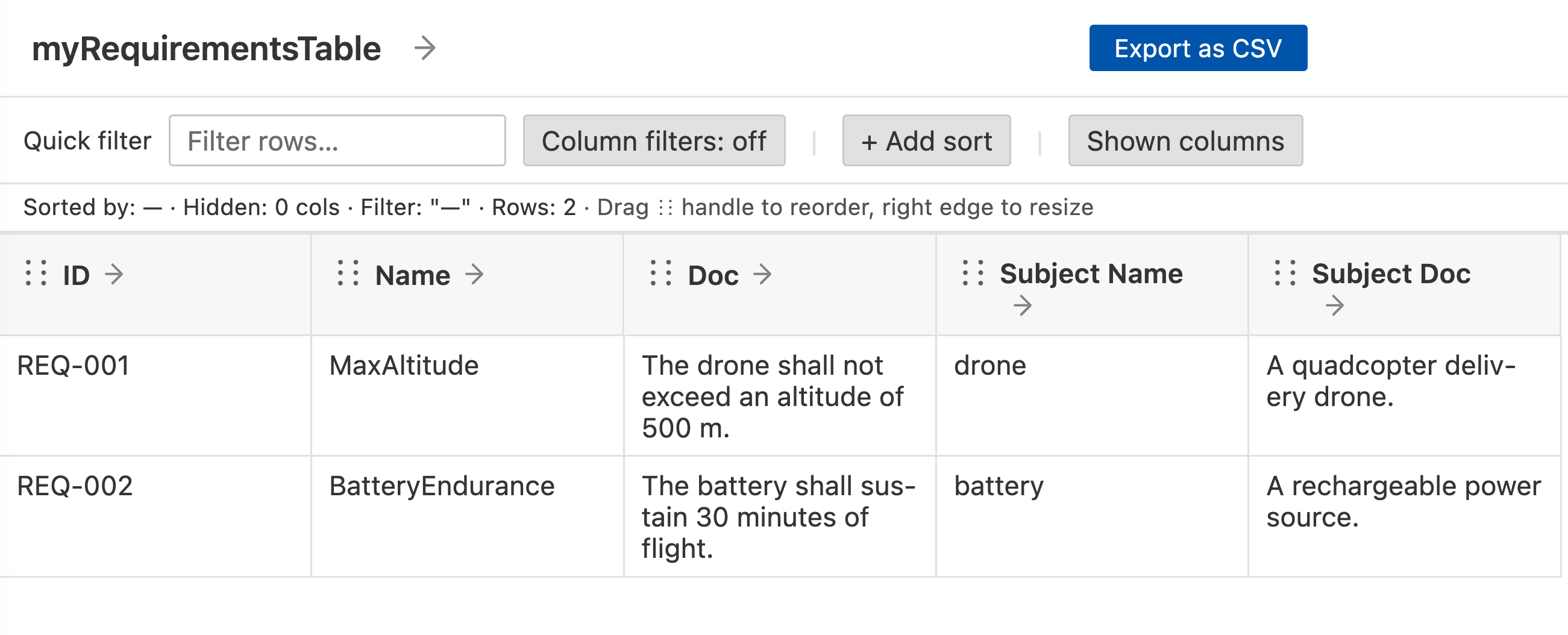
Opening myRequirementsTable in the SysMLv2 Views panel renders one row per requirement. The first three columns
are three representations of the same row element, and the last two follow chains
away from it: to the subject, and on to the subject’s definition:
and REQ-002 with ID, Name, Documentation, Subject Name, and Subject Documentation columns.
Learn more
Table view structure - the anatomy of a table view: column attributes, table attributes, hierarchical tables
Navigation chains - how a column navigates from the row element to the element it shows: steps, named navigations, fanning out rows
Representations - what aspect of an element a column renders, cell outcomes, and which cells can be edited
Common patterns - ready-made recipes for the most common columns
Examples - complete, downloadable example tables together with the models they render
Migrating from column types - updating views written using the retired
featureToRender/ColumnTypeAPI