
Configure matrix views
A matrix view is a traceability tool. Each row and column is an element from an
independent expose / filter selection. Each cell is marked where a recognised
relationship exists between the corresponding pair.
This page covers the SysML authoring pieces specific to matrices. See also:
Foundations - shared concepts: the library,
ContentViewflags, andexpose/filtermechanicsUse grid views - in-editor workflows, such as adding and removing links
Structure
Every MatrixView redefines a set of built-in sub-views. rowView and
columnView define the two axes independently, each using its own expose /
filter scope. The two axes can draw from different packages, use different filters,
and expose different element types. cellView points to the namespace that contains
the relationships between row and column elements.
Each sub-view also inherits the ContentView attributes, which refine what its expose / filter
scope collects. One default differs there: cellView overrides
includeReferenceElements to true.
A relationship is shown in the matrix only when both its endpoints resolve to elements
present on the two axes (see Strong versus weak matching) and the
relationship itself is reachable from the cellView expose scope.
A minimal example (see Example matrix for full reference):
package MyViews {
    private import SysideViews::*;

    view myTraceMatrix : MVD::MatrixView {
        view :>> rowView {
            expose MyModel::Requirements::*;
            filter hastype SysML::RequirementUsage;
        }
        view :>> columnView {
            expose MyModel::Components::*;
            filter hastype SysML::PartUsage;
        }
        view :>> cellView {
            expose MyModel::**;
        }
    }
}
Cell view
The cellView expose statement points to one or more namespaces that contain the
relationships between row and column elements. The following relationship types are
recognised:
ConnectionUsageAllocationUsageDerivation relationships (
ConnectionUsagetagged with#derivationmetadata)
Directional matching
By default a matrix is undirected: a cell is marked whenever the row element and column
element appear on either end of a relationship, regardless of order. The cellView
accepts a direction attribute to make the matrix directional. Dir is the short
alias for MatrixTraceabilityDirection:
Value |
Symbol |
Meaning |
|---|---|---|
|
|
Either end of the relationship may be on the row or column axis. |
|
|
Source must be a row element, target must be a column element. |
|
|
Source must be a column element, target must be a row element. |
view myAllocationMatrix : MatrixView {
    view :>> rowView {
        expose MyModel::LogicalFunctions::*;
        filter hastype SysML::ActionUsage;
    }
    view :>> columnView {
        expose MyModel::PhysicalComponents::*;
        filter hastype SysML::PartUsage;
    }
    view :>> cellView {
        expose MyModel::**;
        attribute :>> direction = Dir::row2col; // function -> component
    }
}
Strong versus weak matching
Relationships in SysML are written at the usage level: a connection or allocation names specific usage instances as its endpoints. The matrix axes, however, are often populated with definitions. To connect the two, the matrix expands each endpoint in two ways: strongly, to the definitions that type it, and weakly, to the types that contain it.
Strong match
When an endpoint of a relationship is a usage, the matrix automatically considers the definition that types it as an additional candidate. This is the primary mechanism that makes definition-axis matrices work without requiring every relationship to reference definitions explicitly.
For example, if engine : Engine and powertrain : Powertrain are connected, and
the matrix axes contain Engine and Powertrain definitions, that connection
produces a strong match for the Engine x Powertrain cell because Engine is
the direct type of engine and Powertrain is the direct type of powertrain.
// Matrix with Engine (rows) x Powertrain (columns):
part def Engine;
part def Powertrain;

part def Vehicle {
    part engine : Engine;
    part powertrain : Powertrain;

    // strong match: Engine and Powertrain are direct types
    connect engine to powertrain;
}
Weak match
A weak match occurs when the axis element is not the type of a usage endpoint, but
one of the types the endpoint is nested in: the matrix walks each endpoint’s chain
of owning types and weakly marks the pairs those containers form. Using the same
example: Vehicle types neither endpoint, but both engine and powertrain are
its parts, so a Vehicle axis element weakly matches the other end of the
connection.
// Matrix with Engine, Powertrain, and Vehicle on the axes:
part def Engine;
part def Powertrain;

part def Vehicle {
    part engine : Engine;
    part powertrain : Powertrain;

    // strong match: Engine x Powertrain (the endpoints' types)
    // weak matches: Vehicle x Powertrain and Engine x Vehicle
    // (Vehicle owns the endpoints, it types neither)
    connect engine to powertrain;
}
By default, weak matches are hidden. The showWeakTraceability attribute on
cellView controls this (see Matrix attributes). When both a
strong and a weak match exist for the same cell, the strong match takes precedence.
Editable matrix views
Editable matrix views allow adding and removing relationships directly from the matrix
UI. Rather than writing a custom filter, pick a concrete preset from the SysideViews
library. Each preset specialises in one relationship type:
Preset |
Relationship type |
Created pattern |
|---|---|---|
|
|
|
|
|
|
|
Requirement derivation |
#RequirementDerivation::DerivationMetadata connection {
    end #RequirementDerivation::OriginalRequirementMetadata ::> a;
    end #RequirementDerivation::DerivedRequirementMetadata ::> b;
}
|
All three presets inherit from EditableMatrixView, which automatically restricts
rowView and columnView to Definition elements (filter istype SysML::Definition) and sets exposeFeaturesAndHeritage = true on the cellView;
neither needs to be written explicitly. The axes do not get the traversal, so an
axis that should collect definitions through usages sets exposeFeaturesAndHeritage
itself, as the example does.
An editable matrix must admit exactly one relationship kind; the presets guarantee this
by construction. A matrix whose cellView filter admits several kinds, or none of the
supported ones, opens as read-only with a warning explaining what to change.
Supported modelling pattern
Editable matrix views operate on the Definition-Usage pattern, applied as follows:
Axes -
rowViewandcolumnVieware populated byDefinitionelements, enforced automatically byEditableMatrixView.Cell container - a single
Typeowns theUsagefeatures that represent relationships between those definitions. This is theTypeexposed bycellView.
The cellView expose must point to that single container Type. When a
relationship is created from a cell (right-click, Add Traceability), the
extension walks the features of the exposed Type looking for Usages whose type
matches a Definition on each axis. New relationships are anchored there.
A minimal connection matrix example:
part def Sender;
part def InputPort;
part def Receiver {
    part inputPort : InputPort;
}

part def System {               // single Type that needs to be exposed by cellView
    part sender : Sender;
    part receiver : Receiver;
    connection connect sender to receiver.inputPort;
}
Disabled cells
Because new relationships are anchored to the Usages of the cell container, a
Definition on an axis must be represented by exactly one such usage. Otherwise the
Add Traceability context-menu entry is disabled for the row or column
element, with a warning explaining why:
No usage typed by that
Definitionexists in the cell namespaceMore than one usage typed by that
Definitionexists; the target is ambiguous
For example, given:
package ExampleColumnNamespace {
    part def ColumnA;
    part def ColumnB;        // no usage in TraceabilityContext → creation disabled
}
package ExampleRowNamespace {
    part def RowA;
    part def RowB {
        part subpart_a : RowA;  // RowA reachable through RowB's subpart
    }
}
package ExampleTraceabilityNamespace {
    private import ExampleColumnNamespace::*;
    private import ExampleRowNamespace::*;
    item def TraceabilityContext {
        part column_a : ColumnA;  // typed by ColumnA ✔
        part row_b : RowB;        // typed by RowB ✔; RowA reachable via row_b.subpart_a
    }
}
The matrix marks ColumnB with a warning because no usage typed by it exists in
TraceabilityContext, so Add Traceability is disabled for that column.
Matrix attributes
Set on rowView, columnView, or cellView as noted.
Attribute |
Set on |
Default |
Description |
|---|---|---|---|
|
rowView, columnView |
|
Label shown in matrix headers. Values: |
|
columnView |
|
Rotates column header text 90 degrees to save horizontal space. Toggleable in the UI. See Header representation. |
|
cellView |
|
Constrains which end of a relationship may sit on which axis. See Directional matching. |
|
cellView |
|
Includes weak matches alongside strong matches. See Strong versus weak matching. |
|
cellView |
|
Treats connections to a port as direct connections to the port’s owner. Applies
to connections, derivations included; it has no effect on |
Header representation
The representation attribute controls the label text shown in matrix headers.
Rep is the short alias for MatrixElementRepresentation:
view :>> rowView {
    expose MyModel::Requirements::*;
    filter hastype SysML::RequirementUsage;
    attribute :>> representation = Rep::shortName; // show <'REQ-001'> etc.
}
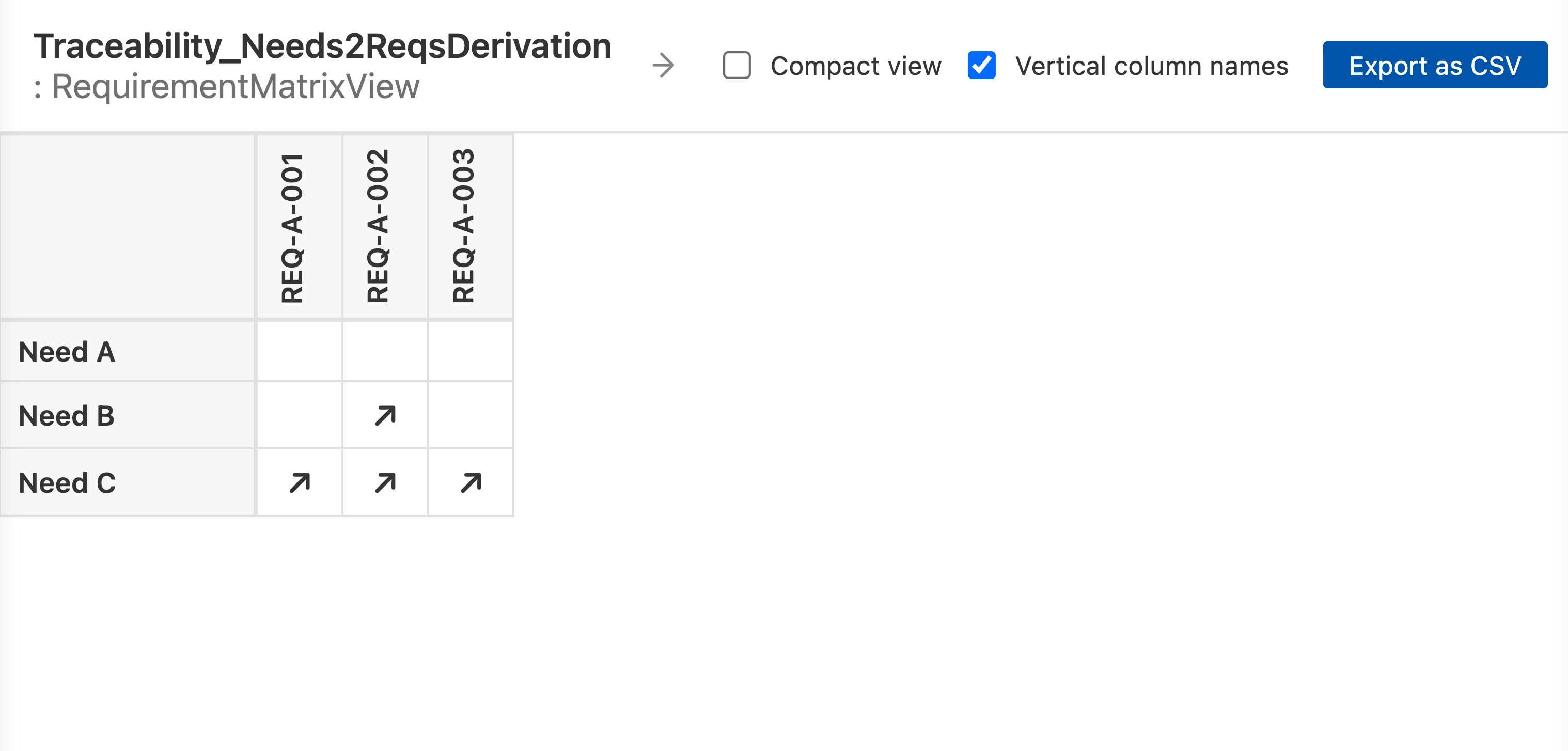
The verticalColumnNames attribute rotates column headers 90 degrees to save
horizontal space when there are many columns:
view :>> columnView {
    expose MyModel::Components::*;
    filter hastype SysML::PartUsage;
    attribute :>> verticalColumnNames = true;
}
Port transparency
When portsAreTransparent is set to true, connections to a port are treated as
direct connections to the port’s owner. This is useful when connections are wired
through ports and the matrix should show the logical owner-to-owner relationship rather
than owner-to-port:
port def DataPort;

part def Sender {
    port output : DataPort;
}
part def Receiver {
    port input : DataPort;
}
part def System {
    part s : Sender;
    part r : Receiver;
    connect s.output to r.input;
}
Without portsAreTransparent, the matrix would not strongly mark the Sender x
Receiver cell, because the connection endpoints are ports, not the parts
themselves (with weak matching on, the
pair would still surface as a weak mark through the ports’ owners). With it set, the
port lookup is transparent and the cell gets a strong mark:
view :>> cellView {
    expose MyModel::System::*;
    attribute :>> portsAreTransparent = true;
}
Example matrix
A reference template combining an editable preset, a ContentView flag, and matrix
attributes:
package MyViews {
    private import SysideViews::*;

    item def ContextForViews {
        view allocationMatrix : MVD::AllocationMatrixView {
            doc
            /* Rows are requirements, columns are system design elements, cells show allocation links. */

            view :>> rowView {
                expose SystemRequirements::'Requirement Group A'::*;
                attribute :>> exposeFeaturesAndHeritage = true;
                attribute :>> representation = Rep::shortName;
            }
            view :>> columnView {
                expose SystemStructure::SimpleSystem::*;
                attribute :>> exposeFeaturesAndHeritage = true;
                attribute :>> representation = Rep::name;
                attribute :>> verticalColumnNames = false;
            }
            view :>> cellView {
                expose SystemRequirements::'Requirement Group A';
                attribute :>> direction = Dir::undirected;
            }
        }
    }
}
Reference files
The example imports the SysideViews library, which is not included in the download. Open the example in the Views Explorer, or export it with syside table export.