

Configure matrix views
A matrix view is a traceability tool. Each row and column is an element from an
independent expose / filter selection. Each cell is marked where a recognised
relationship exists between the corresponding pair.
This page covers the SysML authoring pieces specific to matrices. See also:
Foundations - shared concepts: the library,
ContentViewflags, andexpose/filtermechanicsUse grid views - in-editor workflows, such as adding and removing links
Structure
Every MatrixView redefines a set of built-in sub-views. rowView and
columnView define the two axes independently, each using its own expose /
filter scope. The two axes can draw from different packages, use different filters,
and expose different element types. cellView points to the namespace that contains
the relationships between row and column elements.
Each sub-view also inherits the ContentView attributes, which refine what its expose / filter
scope collects.
A relationship is shown in the matrix only when both its endpoints resolve to elements
present on the two axes (see Strong versus weak matching) and the
relationship itself is reachable from the cellView expose scope.
A minimal example (see Example matrix for full reference):
package MyViews {
    private import SysideViews::*;

    view myTraceMatrix : MVD::MatrixView {
        view :>> rowView {
            expose MyModel::Requirements::*;
            filter hastype SysML::RequirementUsage;
        }
        view :>> columnView {
            expose MyModel::Components::*;
            filter hastype SysML::PartUsage;
        }
        view :>> cellView {
            expose MyModel::**;
        }
    }
}
Cell view
The cellView expose statement points to one or more namespaces that contain the
relationships between row and column elements. The following relationship types are
recognised:
ConnectionUsageAllocationUsageDerivation relationships (
ConnectionUsagetagged with#derivationmetadata)
Directional matching
By default a matrix is undirected: a cell is marked whenever the row element and column
element appear on either end of a relationship, regardless of order. The cellView
accepts a direction attribute to make the matrix directional. Dir is the short
alias for MatrixTraceabilityDirection:
Value |
Symbol |
Meaning |
|---|---|---|
|
|
Either end of the relationship may be on the row or column axis. |
|
|
Source must be a row element, target must be a column element. |
|
|
Source must be a column element, target must be a row element. |
view myAllocationMatrix : MatrixView {
    view :>> rowView {
        expose MyModel::LogicalFunctions::*;
        filter hastype SysML::ActionUsage;
    }
    view :>> columnView {
        expose MyModel::PhysicalComponents::*;
        filter hastype SysML::PartUsage;
    }
    view :>> cellView {
        expose MyModel::**;
        attribute :>> direction = Dir::row2col; // function -> component
    }
}
Strong versus weak matching
Relationships in SysML are written at the usage level: a connection or allocation names specific usage instances as its endpoints. The matrix axes, however, are often populated with definitions. To connect the two, the matrix expands each endpoint through two levels.
Strong match
When an endpoint of a relationship is a usage, the matrix automatically considers the definition that types it as an additional candidate. This is the primary mechanism that makes definition-axis matrices work without requiring every relationship to reference definitions explicitly.
For example, if engine : Engine and powertrain : Powertrain are connected, and
the matrix axes contain Engine and Powertrain definitions, that connection
produces a strong match for the Engine x Powertrain cell because Engine is
the direct type of engine and Powertrain is the direct type of powertrain.
// Matrix with Engine (rows) x Powertrain (columns):
part def Engine;
part def Powertrain;

part def Vehicle {
    part engine : Engine;
    part powertrain : Powertrain;

    // strong match: Engine and Powertrain are direct types
    connect engine to powertrain;
}
Weak match
A weak match occurs when the axis element is not the direct type of a usage endpoint,
but is reachable through the heritage chain of that type. Using the same example: if the
matrix also has a PoweredComponent axis element that Engine specialises, the
PoweredComponent x Powertrain cell would be weakly marked, because
PoweredComponent is an ancestor of Engine, not its direct type.
// Matrix with PoweredComponent (rows) x Powertrain (columns):
part def PoweredComponent;
part def Engine :> PoweredComponent;
part def Powertrain;

part def Vehicle {
    part engine : Engine;
    part powertrain : Powertrain;

    // weak match: Engine is a descendant of PoweredComponent,
    // not its direct type
    connect engine to powertrain;
}
By default, weak matches are hidden. The showWeakTraceability attribute on
cellView controls this (see Matrix attributes). When both a
strong and a weak match exist for the same cell, the strong match takes precedence.
Editable matrix views
Editable matrix views allow adding and removing relationships directly from the matrix
UI. Rather than writing a custom filter, pick a concrete preset from the SysideViews
library. Each preset specialises in one relationship type:
Preset |
Relationship type |
Created pattern |
|---|---|---|
|
|
|
|
|
|
|
Requirement derivation |
#RequirementDerivation::DerivationMetadata connection {
    end #RequirementDerivation::OriginalRequirementMetadata ::> a;
    end #RequirementDerivation::DerivedRequirementMetadata ::> b;
}
|
All three presets inherit from EditableMatrixView, which automatically restricts
rowView and columnView to Definition elements (filter istype SysML::Definition); this filter does not need to be written explicitly.
An editable matrix must admit exactly one relationship kind; the presets guarantee this
by construction. A matrix whose cellView filter admits several kinds, or none of the
supported ones, opens as read-only with a warning naming the filter clause to fix.
Supported modelling pattern
Editable matrix views operate on the Definition–Usage pattern, applied as follows:
Axes -
rowViewandcolumnVieware populated byDefinitionelements, enforced automatically byEditableMatrixView.Cell container - a single
Typeowns theUsagefeatures that represent relationships between those definitions. This is theTypeexposed bycellView.
The cellView expose must point to that single container Type. When a cell is
clicked to create a relationship, the extension walks the features of the exposed
Type looking for Usages whose type matches a Definition on each axis. New
relationships are anchored there.
A minimal connection matrix example:
part def Sender;
part def InputPort;
part def Receiver {
    part inputPort : InputPort;
}

part def System {               // single Type that needs to be exposed by cellView
    part sender : Sender;
    part receiver : Receiver;
    connection connect sender to receiver.inputPort;
}
Disabled cells
Because new relationships are anchored to the Usages of the cell container, a
Definition on an axis must be represented by exactly one such usage. Otherwise the
Add Traceability button is disabled for the row or column element, with a
warning explaining why:
No usage typed by that
Definitionexists in the cell namespaceMore than one usage typed by that
Definitionexists; the target is ambiguous
For example, given:
package ExampleColumnNamespace {
    part def ColumnA;
    part def ColumnB;        // no usage in TraceabilityContext → creation disabled
}
package ExampleRowNamespace {
    part def RowA;
    part def RowB {
        part subpart_a : RowA;  // RowA reachable through RowB's subpart
    }
}
package ExampleTraceabilityNamespace {
    private import ExampleColumnNamespace::*;
    private import ExampleRowNamespace::*;
    item def TraceabilityContext {
        part column_a : ColumnA;  // typed by ColumnA ✔
        part row_b : RowB;        // typed by RowB ✔; RowA reachable via row_b.subpart_a
    }
}
The matrix marks ColumnB with a warning because no usage typed by it exists in
TraceabilityContext, so the Add Traceability button is disabled for that
column.
Matrix attributes
Set on rowView, columnView, or cellView as noted.
Attribute |
Set on |
Default |
Description |
|---|---|---|---|
|
rowView, columnView |
|
Label shown in matrix headers. Values: |
|
rowView, columnView |
|
Rotates column header text 90 degrees to save horizontal space. Toggleable in the UI. See Header representation. |
|
cellView |
|
Constrains which end of a relationship may sit on which axis. See Directional matching. |
|
cellView |
|
Includes weak matches alongside strong matches. See Strong versus weak matching. |
|
cellView |
|
Treats connections to a port as direct connections to the port’s owner. Applies
to |
Header representation
The representation attribute controls the label text shown in matrix headers.
Rep is the short alias for MatrixElementRepresentation:
view :>> rowView {
    expose MyModel::Requirements::*;
    filter hastype SysML::RequirementUsage;
    attribute :>> representation = Rep::shortName; // show <'REQ-001'> etc.
}
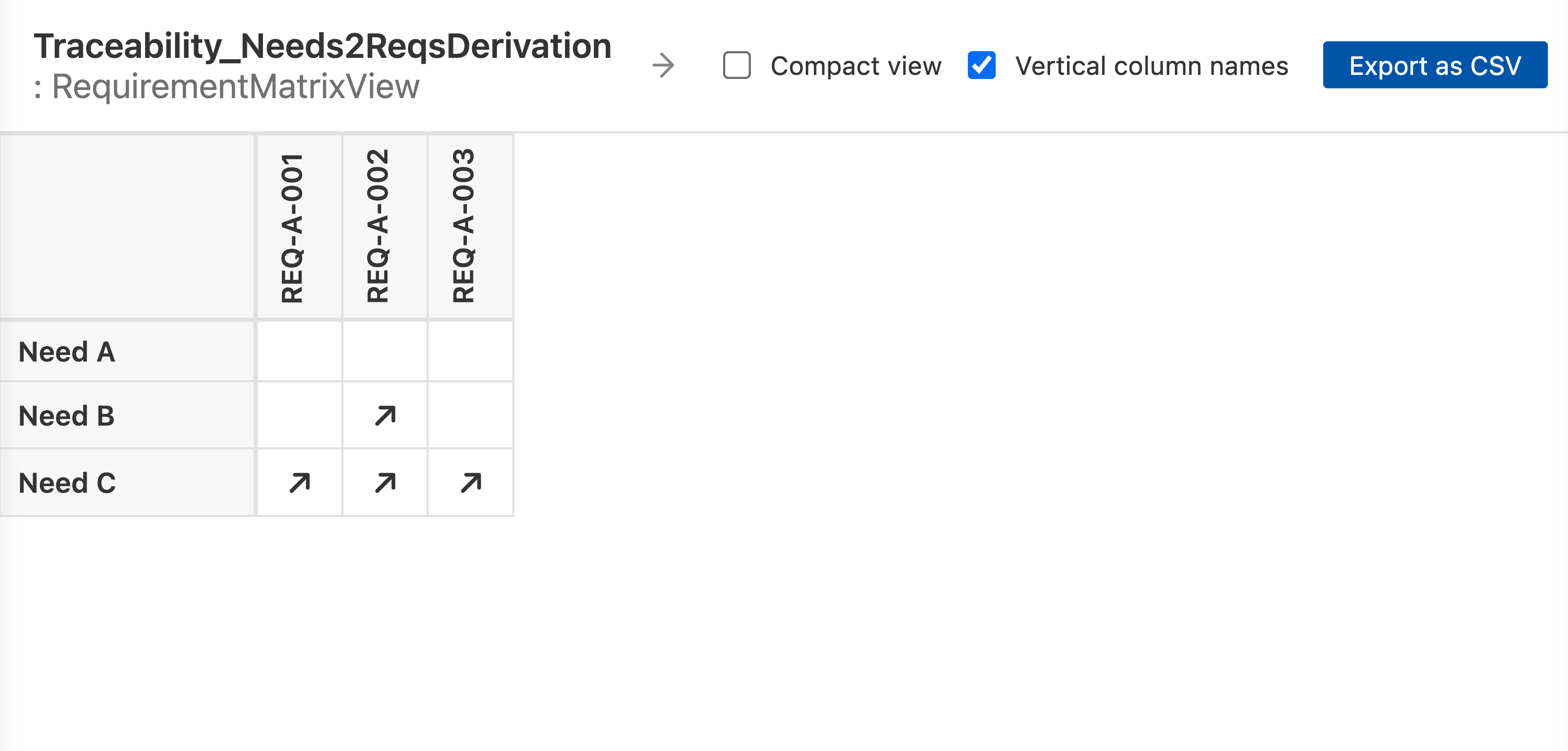
The verticalColumnNames attribute rotates column headers 90 degrees to save
horizontal space when there are many columns:
view :>> columnView {
    expose MyModel::Components::*;
    filter hastype SysML::PartUsage;
    attribute :>> verticalColumnNames = true;
}
Port transparency
When portsAreTransparent is set to true, connections to a port are treated as
direct connections to the port’s owner. This is useful when connections are wired
through ports and the matrix should show the logical owner-to-owner relationship rather
than owner-to-port:
part def Sender {
    port out : DataPort;
}
part def Receiver {
    port in : DataPort;
}
part def System {
    part s : Sender;
    part r : Receiver;
    connect s.out to r.in;
}
Without portsAreTransparent, the matrix would not mark the Sender x Receiver
cell because the connection endpoints are ports, not the parts themselves. With it set,
the port lookup is transparent and the cell is marked:
view :>> cellView {
    expose MyModel::System::*;
    attribute :>> portsAreTransparent = true;
}
Example matrix
A reference template combining an editable preset, a ContentView flag, and matrix
attributes:
package MyViews {
    private import SysideViews::*;

    item def ContextForViews {
        view allocationMatrix : MVD::AllocationMatrixView {
            doc
            /* Rows are requirements, columns are system design elements, cells show allocation links. */

            view :>> rowView {
                expose SystemRequirements::'Requirement Group A'::*;
                attribute :>> exposeFeaturesAndHeritage = true;
                attribute :>> representation = Rep::shortName;
            }
            view :>> columnView {
                expose SystemStructure::SimpleSystem::*;
                attribute :>> exposeFeaturesAndHeritage = true;
                attribute :>> representation = Rep::name;
                attribute :>> verticalColumnNames = false;
            }
            view :>> cellView {
                expose SystemRequirements::'Requirement Group A';
                attribute :>> direction = Dir::undirected;
            }
        }
    }
}
Reference files
The example imports the SysideViews library, which is not included in the download. Open the example in the Views Explorer, or export it with syside table export.