

Table navigation chains
A cell in a Syside VS Code Extension table view often needs to show something that
lives near the row element rather than on it, such as the subject of a requirement,
the value of a named attribute or the definition typing a usage. A navigation chain,
written in a column’s columnFeature, is
how the column gets from the row element to that related element. The exact steps
and their parameters are listed in Navigation step reference, and
Add frequently used table columns has the chains most tables need, ready to copy.
A chain starts from baseViewElement, the row’s own element, and wraps it in
navigation steps. Each step takes an element and navigates to elements related to it,
such as Owner(…) for the owning element or NamedUsage(…, "mass", …) for a feature
by name. The first argument of a step is what it navigates from, and the remaining
arguments are parameters:
// the "torque" attribute of each row element, looked up by name
:>> columnFeature = NamedUsage(baseViewElement, "torque", NameType::name);
Steps nest, and a chain reads from the inside out. This chain hops from each part
usage to the definition typing it, then on to that definition’s torque:
// the "torque" attribute of the definition typing each row element
:>> columnFeature = NamedUsage(
    DefinitionsFirst(baseViewElement),
    "torque",
    NameType::name
);
One element, a list, or a split row
Some navigations find at most one element, such as an element’s owner or a
requirement’s subject. Those come as single steps, here Owner and Subject, and
the result can always be navigated further. NamedUsage, which looks a feature up
by name, is also a single step and expects one match. If several features share the
name, it behaves like a First step, described below.
Other navigations may find several elements, such as the definitions typing a usage, the supertypes of a definition or the ports of a part. Each of those comes as a family of three steps, and the suffix says what happens to the targets it finds:
Suffix |
What it does with the targets it finds |
|---|---|
|
Expects exactly one target and lets further steps chain onto it. If the navigation finds more than one, the cell shows the first with a warning instead of quietly picking one (the truncated outcome). |
|
Renders every target together in one read-only cell. A list cannot be navigated
onwards, so a |
|
Fans the row out into one row per target. Because this changes the shape of
the whole table, a |
Note
The table describes the step families the library defines, not a naming rule. The
suffix carries no behavior of its own: adding First, List or Fan to a step the
library defines without one does not make the navigation behave differently. The
steps that exist are listed in Navigation step reference.
The members of a family usually take the same parameters, and differ only in how
they handle their targets. Heritage is the exception: HeritageList and
HeritageFan take an optional depth, while HeritageFirst takes none, because it
looks only at the types an element directly specializes.
Sharing one chain between columns
A chain does not have to be written out inside the column that uses it. Declaring a named navigation at view level gives a chain a name that any column can start from. Take a fleet of two drones, each with an engine:
package DroneProject {
    part def Engine {
        attribute power;
    }
    part def ElectricMotor :> Engine;
    part def CombustionEngine :> Engine;

    package Fleet {
        part def Scout {
            part engine : ElectricMotor {
                doc /* Brushless motor sized for long hover times. */
                attribute :>> power = 1.2;
            }
        }
        part def Hauler {
            part engine : CombustionEngine {
                doc /* Two-stroke engine for heavy payloads. */
                attribute :>> power = 6.5;
            }
        }
    }
}
This view has one row per drone and three columns about its engine:
package MyViews {
    private import SysideViews::*;

    view enginesTable : TVD::TableView {
        expose DroneProject::Fleet::*;
        filter hastype SysML::PartDefinition;

        engine = NamedUsage(
            baseViewElement,
            "engine",
            NameType::name,
            UsageKind::partUsage
        );

        view Drone :> columnViews {
            attribute :>> featureRepresentation :> ColRep::declaredName;
        }
        view 'Engine Type' :> columnViews {
            :>> columnFeature = DefinitionsFirst(engine);
            attribute :>> featureRepresentation :> ColRep::declaredName;
        }
        view 'Engine Power' :> columnViews {
            :>> columnFeature = NamedUsage(
                engine,
                "power",
                NameType::name,
                UsageKind::attributeUsage
            );
            attribute :>> featureRepresentation :> ColRep::featureValue;
        }
        view 'Engine Documentation' :> columnViews {
            :>> columnFeature = engine;
            attribute :>> featureRepresentation :> ColRep::specificDocumentation;
        }
    }
}
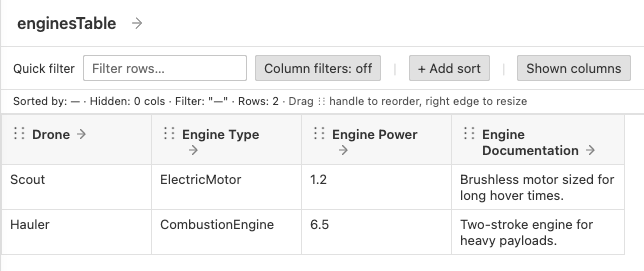
The three engine columns share the step that finds the engine, so it is written once.
Engine Type continues to the definition typing the engine, Engine Power to one of
its attributes, and Engine Documentation uses the navigation directly.
Referencing a named navigation is exactly equivalent to writing its chain out in place, so it changes nothing about the rendered table. It is worth reaching for whenever several columns share a prefix: correcting the shared part later means editing one line rather than every column that repeated it.
A named navigation can hold any valid chain, with two limits:
It has to navigate somewhere.
alias = engine;orroot = baseViewElement;only renames something that already has a name, so it is rejected with a hint to reference the original directly.Named navigations can build on one another, as a fan-out that continues another does, but not in a cycle.
Fanning a row out
Every step so far produces at most one cell per row. A Fan step is different: it
turns one row into several, one per target it finds. A table whose rows are parts can
show one row per port of each part, while still showing each part’s own values
alongside.
Take a model with a pump whose two ports share a definition, where only inlet
sets the maxPressure it declares, and a gauge with no ports at all:
package Plant {
    port def FluidPort {
        attribute maxPressure;
    }

    part def Station {
        part pump {
            port inlet : FluidPort {
                attribute :>> maxPressure = 5.0;
            }
            port outlet : FluidPort;
        }
        part gauge;
    }
}
The view has one row per part of Station and fans each row out over the part’s
ports:
package MyViews {
    private import SysideViews::*;

    view stationPorts : TVD::TableView {
        expose Plant::Station::*;
        filter hastype SysML::PartUsage;

        ports = UsageFan(baseViewElement, UsageKind::portUsage);

        view Part :> columnViews {
            attribute :>> featureRepresentation :> ColRep::declaredName;
        }
        view Port :> columnViews {
            :>> columnFeature = ports;
            attribute :>> featureRepresentation :> ColRep::declaredName;
        }
        view 'Max Pressure' :> columnViews {
            :>> columnFeature = NamedUsage(
                ports,
                "maxPressure",
                NameType::name,
                UsageKind::attributeUsage
            );
            attribute :>> featureRepresentation :> ColRep::featureValue;
            attribute :>> defaultValue = "(unset)";
        }
    }
}
Over that model, the view renders:
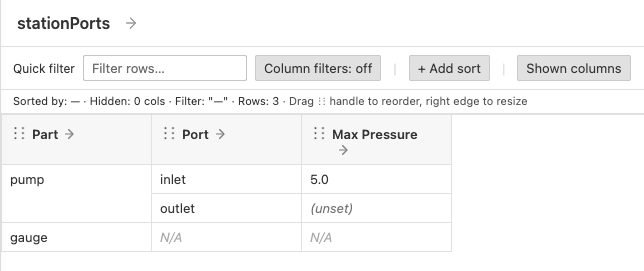
That table shows the three things that define a fan-out:
The fan-out has a name. Splitting rows affects the whole table rather than one column, so a
Fanstep cannot sit inline in a column. It is declared as a named navigation, hereports, and such a name is called an anchor.PortandMax Pressureboth point at the anchor, which is what puts their cells on the same fanned-out rows.Partnever references it, so it stays one cell per part, merged across the rows its ports produced.outletandgaugeare empty for different reasons.outletexists but sets no value, so its cell shows the column’sdefaultValue.gaugehas no ports at all, so there is no port for either fanned cell to be about, and those cells shownotApplicableValue(see Cell outcomes).gaugestill has a row. A fan-out never removes rows. A row whose fan-out found nothing stays as exactly one row, so nothing silently disappears from the table.
Part shows one cell merged across both of pump’s fanned-out rows. How finely a
column splits depends only on the fan-outs in its chain, so reordering columns
changes no row and no cell value. Cells merge by element, not by text: two ports
that share a name stay two cells.
Anchors
An anchor is what makes several columns share the same fanned-out rows, so a few rules follow from that role.
The Fan step is always the outermost call of the anchor, never nested inside
another step. Columns then reference the anchor and apply only non-fanning steps to
it, as Max Pressure does with NamedUsage(ports, …). Columns that share an anchor
are aligned by it: on any given row, their cells describe the same port. Two columns
that fan over the same feature through separate anchors fan out in parallel, even
when the two anchors are written identically, and that disables the table (see
The whole table is disabled). Reusing one anchor is the way to put
several columns on one fanned target.
A table can fan out more than once by starting one anchor from another, for example one row per item of each port:
ports = UsageFan(baseViewElement, UsageKind::portUsage);
items = UsageFan(ports, UsageKind::itemUsage);
Anchors therefore form a chain, each starting from baseViewElement or from exactly
one other anchor. What a table cannot do is fan out in two directions at once. Two
anchors that start from the same element, whether baseViewElement or another
anchor, would make every combination of two unrelated sets, so the table reports an
error instead of rendering (see The whole table is disabled).
Fanned-out rows appear in the order their targets are declared in the model, so row order is stable across reloads. In a hierarchical table a row’s fanned-out rows are siblings at the same tree position, and the row’s child rows hang off the last of them. The tree column itself may never fan out.