

Matrix view structure
A matrix view in the Syside VS Code Extension is typed by MVD::MatrixView and
redefines three sub-views: one for
the rows, one for the columns and one for the relationships that mark the cells. How
those parts work together is explained in Matrix view concepts.
Structure
package MyViews {
    private import SysideViews::*;

    view myTraceMatrix : MVD::MatrixView {
        attribute :>> isEditable = true;  // optional, default false

        view :>> rowView {
            expose MyModel::System::**;
            filter hastype SysML::RequirementUsage;
        }
        view :>> columnView {
            expose MyModel::System::**;
            filter hastype SysML::PartUsage;
        }
        view :>> cellView {
            expose MyModel::System;
            filter hastype SysML::AllocationUsage;
            attribute :>> direction = Dir::row2col;
        }
    }
}
Sub-view |
Selects |
Its |
|---|---|---|
|
The row elements, the same way a flat table selects its rows. |
Judges each element on its own. |
|
The column elements, independently of the rows. |
Judges each element on its own. |
|
The relationship elements that can mark a cell. |
Selects which relationships can mark a cell. It never prunes what the |
Each sub-view takes its own expose and filter statements and its own
include flags.
Relationship kinds
A cell is marked by a relationship of one of six kinds: a connection, an allocation
or a requirement derivation, each written as a usage or as a definition. A
derivation is a connection carrying the #derivation metadata, with its ends tagged
#original and #derive. These come from the RequirementDerivation library. A
relationship the filter admits marks cells as its kind or the kind it specializes,
so an interface marks cells as a connection. Flow, binding and succession
connectors are not connections and never mark a cell.
An editable matrix creates the one kind its
cellView filter admits, so it is editable only when the filter admits exactly one
kind. hastype matches a kind exactly, not
its specializations, so hastype SysML::ConnectionUsage admits neither an
allocation nor a derivation. Each snippet below shows a filter that admits exactly
one kind, and the SysML each new cell then writes. A and B stand for the row and
column definitions, and a and b for the row and column ends:
Connection definition
// cellView filter
filter hastype SysML::ConnectionDefinition;

// Each new cell writes
connection def { end : A; end : B; }
Allocation definition
// cellView filter
filter hastype SysML::AllocationDefinition;

// Each new cell writes
allocation def { end : A; end : B; }
Derivation definition
// cellView filter
filter (
    @ RequirementDerivation::derivation and
    as SysML::ConnectionDefinition hastype SysML::ConnectionDefinition
);

// Each new cell writes
#RequirementDerivation::DerivationMetadata connection def {
    end #RequirementDerivation::OriginalRequirementMetadata : A;
    end #RequirementDerivation::DerivedRequirementMetadata : B;
}
Connection usage
// cellView filter
filter hastype SysML::ConnectionUsage;

// Each new cell writes
connection connect a to b;
Allocation usage
// cellView filter
filter hastype SysML::AllocationUsage;

// Each new cell writes
allocate a to b;
Derivation usage
// cellView filter
filter (
    @ RequirementDerivation::derivation and
    as SysML::ConnectionUsage hastype SysML::ConnectionUsage
);

// Each new cell writes
#RequirementDerivation::DerivationMetadata connection {
    end #RequirementDerivation::OriginalRequirementMetadata ::> a;
    end #RequirementDerivation::DerivedRequirementMetadata ::> b;
}
Tip
Write qualified names in filters, as with SysML::PartDefinition, instead of
importing the package into the view. The packages a view exposes can then import the
same names without the model reporting Filter expression potentially references a
name that is filtered by the expression.
A definition is unnamed, and its ends are typed by the row and column definitions. A
usage’s ends are paths from the cellView’s context to the row and column elements,
such as propulsion.motor. In a directed matrix the source end is written first. In
a derivation, the source end is the #original one.
What the cellView must expose for editing depends on the kind:
Definition kinds write into the namespace the
cellView’s firstexposenames. Expose its members (expose Pkg::*;) so that a new definition is read back.Usage kinds write into one context: the
cellViewexposes exactly one element, a definition or usage, with a non-recursiveexpose X;. New relationships are written intoX.
Direction values
direction is set on cellView. Dir is the short name of
MatrixTraceabilityDirection:
Value |
Symbol |
Meaning |
|---|---|---|
|
|
Either end of the relationship may be on the row or column axis. |
|
|
Source must be a row element, target must be a column element. |
|
|
Source must be a column element, target must be a row element. |
For a requirement derivation, the source is the end tagged #original and the target
the end tagged #derive, whatever order they are written in.
Attributes
Matrix attributes
Set on the matrix view itself:
Attribute |
Description |
|---|---|
|
Allows adding and removing relationships from the matrix. See
What an editable matrix writes. |
Row and column attributes
Set on rowView or columnView:
Attribute |
Description |
|---|---|
|
Label shown in the headers. Values: |
|
Labels each header with the definition typing the element, when exactly one
does. Display only: the row is still the element. |
|
Shows reference usages, such as ports, attributes and usages declared in a
package. See Include flags in grid views. |
|
Shows abstract elements. See Include flags in grid views. |
|
Walks a recursive |
Column-specific attributes
Set on columnView only:
Attribute |
Description |
|---|---|
|
Rotates column header text 90 degrees to save horizontal space. Toggleable in
the UI. |
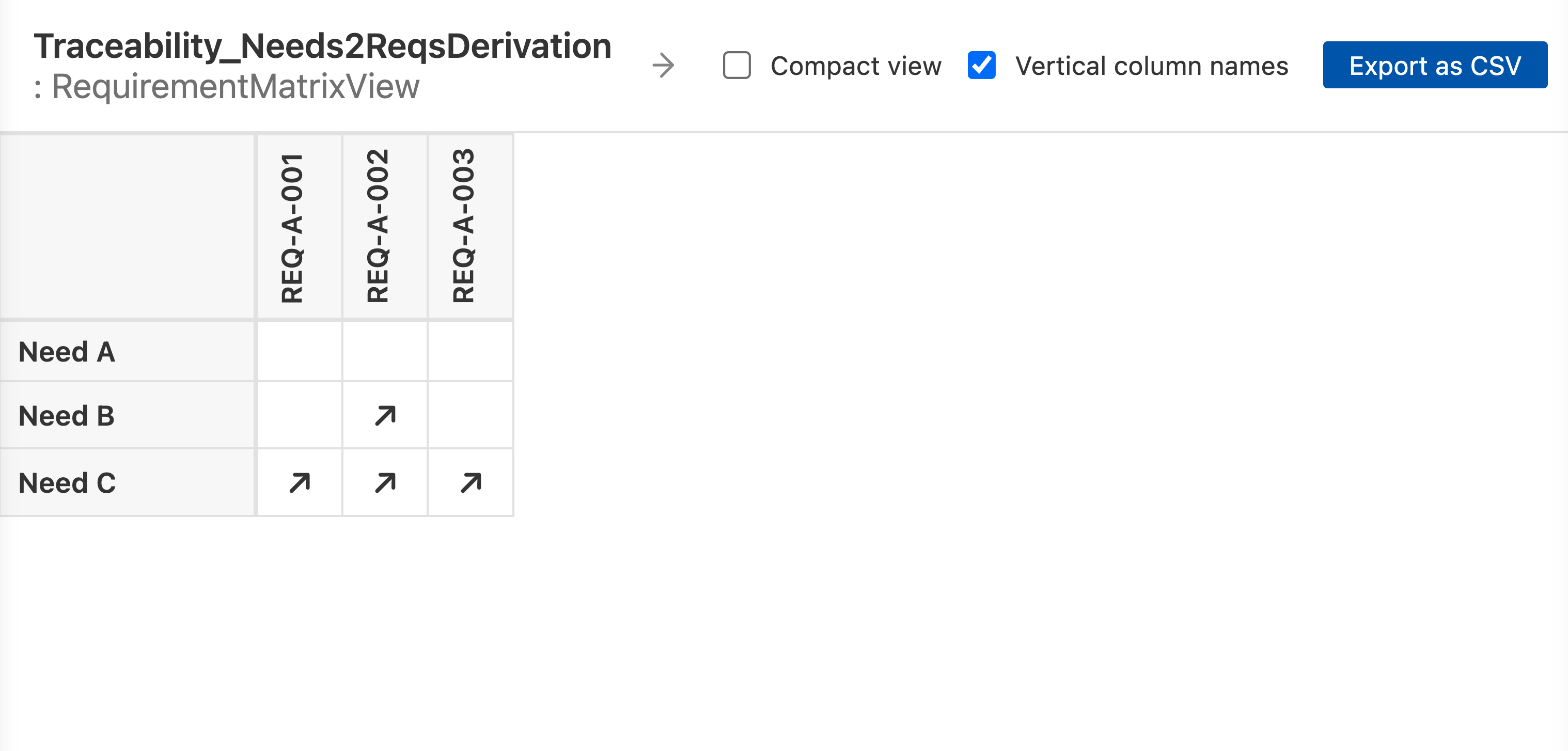
With verticalColumnNames = true, the column headers are rotated:
Cell attributes
Set on cellView:
Attribute |
Description |
|---|---|
|
Which end of a relationship may sit on which axis. See
Direction values. |
|
Also marks cells where the relationship is between elements inside the row and
column elements. See Weak marks. |
|
Treats a relationship end that is a port as the element the relationship
reaches it through. Usage relationships only: connections, allocations and
derivations. See Port transparency. |
|
Includes reference usages among the relationships. See
Include flags in grid views. |
|
Includes abstract relationships. See Include flags in grid views. |
|
Walks a recursive |