

Viz command
Generates SysML v2 diagrams from models. Generate diagrams from CLI covers the workflows and examples.
Diagram generation can be further configured using the syside.toml file. See
Diagram settings for the full settings reference.
Note
Diagram generation settings can be defined in multiple places. The order of precedence is listed below (highest wins):
Options passed on the command line
SysML attributes defined on the view (
viewcommand only). See Configure diagram viewsA configuration file: any TOML file passed with
-c/--config, or asyside.tomldiscovered automaticallyBuilt-in defaults
Element command
Generates a diagram for model elements selected by qualified name, without requiring view definitions in the model.
Basic usage
syside viz element <paths...> --name <name> --output-file <file>
<paths...>- one or more.sysml/.kermlfiles or directories (searched recursively)--name <name>- qualified name of the element to visualize. Repeatable to render several roots into one diagram. If omitted, the whole model is rendered--output-file <file>- path to save the image; the file extension selects the format (default:element.svg)
Note
In SysML v2, element names can contain spaces and special characters (e.g. 'Flight Controller v2' or 'Motor "Type A"'). When passing qualified names that contain
such names, make sure to quote or escape them appropriately for the shell. For
example, names with spaces should be wrapped in double quotes:
syside viz element models/ -n "MyPackage::'Flight Controller v2'"
Alternatively, use simple names without spaces or special characters.
Available options
Option |
Description |
|---|---|
|
Display the help message with all available flags and short descriptions |
|
Qualified name of a root element to render
(e.g. |
|
How many levels of descendants to render. |
|
Render style: |
|
SysML v2 view kind: |
|
Diagram theme: |
|
Zoom level for rendering. Applicable only to PNG and JPEG output (default:
|
|
Path to save the image. Format is determined by the extension. Supported
formats: |
|
Path to a configuration file (see Configure the extension) |
|
Additional file, directory, or glob pattern to include. Repeatable |
|
Paths or glob patterns to exclude from file discovery. Repeatable |
Usage examples
Render one part definition to a PNG file:
syside viz element drone-mission/ -n "DroneMission::Components::Drone" -o Drone.svg
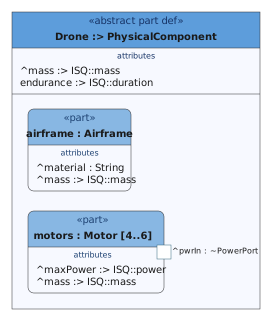
Render a subtree as a two-level decomposition tree:
syside viz element drone-mission/ --render tree -n "DroneMission::Structure::MedicalQuadcopter::medkit" -d 2 -o Medkit_tree.svg
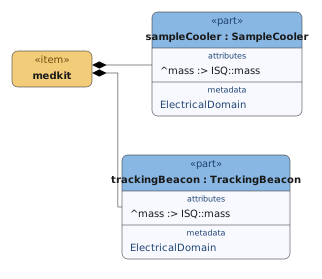
View command
Renders diagrams from SysML v2 views defined in the model. This is the recommended approach for repeatable, version-controlled diagram generation.
See Configure diagram views for defining views and controlling how they render.
Basic usage
syside viz view <paths...>
<paths...>- one or more.sysml/.kermlfiles or directories (searched recursively)
By default, this renders all views found in the model into the ./output directory.
Each view is written as <fileName>.<format>, where fileName is the view’s
fileName attribute. If the attribute is absent, the file is named diagram-<view name>.
Note
Anonymous (unnamed) views are skipped with a warning.
Available options
Option |
Description |
|---|---|
|
Display the help message with all available flags and short descriptions |
|
Render only views at or under this qualified name (e.g. |
|
How many levels of descendants to render. |
|
Render style: |
|
Diagram theme: |
|
Zoom level for rendering. Applicable only to PNG and JPEG output. Overrides the
|
|
Output format: |
|
Directory to write rendered diagrams into (default: |
|
How view filters interact with exposed elements: |
|
Path to a configuration file (see Configure the extension) |
|
Additional file, directory, or glob pattern to include. Repeatable |
|
Paths or glob patterns to exclude from file discovery. Repeatable |
Usage examples
Render all views as PNG files into a
diagramsdirectory:syside viz view drone-mission/ -f png -o diagrams
Render a single view by qualified name. The output file is named by the view’s
fileNameattribute:syside viz view drone-mission/ -f png -o diagrams -n "DroneMissionDiagrams::power_distribution"
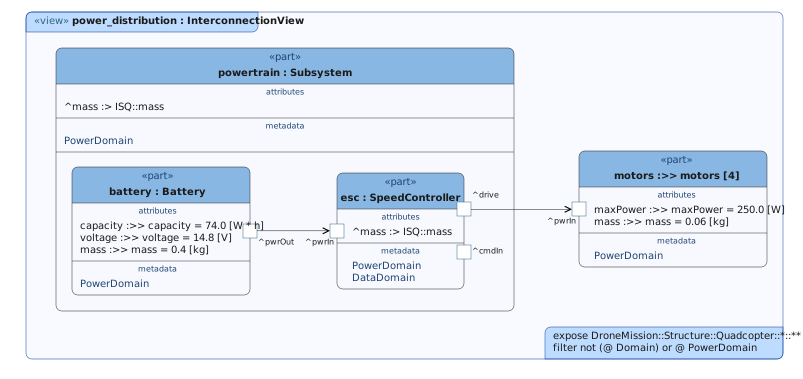
Exit codes
Viz element and view subcommands exit with the following codes:
Code |
Meaning |
|---|---|
|
Success |
|
Failure due to errors in the model, files that fail to load, or an internal error |
|
Command-line usage error, such as an unknown option or a missing argument |
|
Configuration error, configuration file cannot be read |
|
Nothing to draw. At least one requested diagram matched no elements, so no file was written for it |
Changed in version 0.11.0: A diagram with nothing to draw exits with 4. Before, it exited with 0 and wrote an
empty file.
An invalid [viz] setting no longer exits with 2; it falls back to its default with a
warning (see Diagram settings).