

Build a hierarchical table view
In the Syside VS Code Extension, a hierarchical table can show a system breakdown or a requirement hierarchy as a collapsible tree, each row under the element it belongs to. Use one when the nesting is what matters. For a flat list of the same elements, a regular table view is enough.
This guide assumes you can write table columns, as Build a table view shows, and that the SysideViews library is in the workspace.
The guide builds a breakdown of a delivery van. Each definition declares the parts
that sit below it, and each part carries documentation describing its role and an
attribute giving its mass in kilograms. An action and a connection sit alongside the
parts. Save the model as Vehicle.sysml:
package VehicleModel {
    private import ScalarValues::Real;

    part def Vehicle {
        doc /* Delivery van for the city route. */
        attribute mass : Real = 2800.0;

        action drive;

        part powertrain : Powertrain {
            doc /* Turns fuel into torque at the wheels. */
            attribute mass : Real = 310.0;
        }
        part chassis : Chassis {
            doc /* Carries the body and the powertrain. */
            attribute mass : Real = 450.0;
        }
    }

    part def Powertrain {
        part engine : Engine {
            doc /* Produces torque from fuel. */
            attribute mass : Real = 180.0;
        }
        part transmission : Transmission {
            doc /* Sets the ratio between engine and wheel speed. */
            attribute mass : Real = 70.0;
        }

        connect engine to transmission;
    }

    part def Engine {
        part cylinder : Cylinder [4] {
            doc /* One of four combustion chambers. */
            attribute mass : Real = 4.5;
        }
    }

    part def Chassis {
        part frontAxle : Axle {
            doc /* Steers the vehicle. */
            attribute mass : Real = 95.0;
        }
        part rearAxle : Axle {
            doc /* Carries the driven wheels. */
            attribute mass : Real = 110.0;
        }
    }

    part def Transmission;
    part def Cylinder;
    part def Axle;
}
Expose the top of the tree
Type the view by TVD::HierarchicalTableView and give it a recursive expose of the
element at the top of the tree:
package MyViews {
    private import SysideViews::*;

    view vehicleTree : TVD::HierarchicalTableView {
        expose VehicleModel::Vehicle::**;
    }
}
The exposed element is the top row, and beneath each row sit its child rows, one for
each feature it owns and inherits: Vehicle shows powertrain and chassis,
powertrain shows engine and transmission from Powertrain, and so on down to
cylinder. Each row is the feature itself, so frontAxle and rearAxle are two
rows (see Hierarchical tables).
The form of the expose decides the shape of the tree. Vehicle::** makes Vehicle
the top row, and Vehicle::*::** would show the same trees without it. The other
forms are listed in Expose.
Add the columns
Columns are written as in a flat table, with one difference: the first column carries
the tree, indented by depth and holding the expand/collapse control. Redefine
hierarchicalColumn for it rather than subsetting columnViews. Left as it is, it
shows each row’s qualified name.
As in any table, baseViewElement is the row’s feature, so a column about its
definition navigates there with DefinitionsFirst:
    view vehicleTree : TVD::HierarchicalTableView {
        expose VehicleModel::Vehicle::**;

        view Name :>> hierarchicalColumn {
            attribute :>> featureRepresentation :> ColRep::declaredName;
        }
        view Type :> columnViews {
            :>> columnFeature = DefinitionsFirst(baseViewElement);
            attribute :>> featureRepresentation :> ColRep::declaredName;
        }
        view Mass :> columnViews {
            :>> columnFeature = NamedUsage(
                baseViewElement,
                "mass",
                NameType::name,
                UsageKind::attributeUsage
            );
            attribute :>> featureRepresentation :> ColRep::featureValue;
        }
        view Description :> columnViews {
            attribute :>> featureRepresentation :> ColRep::documentation;
        }
    }
The top row is the definition Vehicle, which is not typed by another definition, so
its Type cell shows the column’s notApplicableValue, N/A by default.
Keep only the rows you want
The mass attributes do not appear as rows. Attributes and ports are reference
usages and stay hidden unless the view sets includeReferenceElements, which is why Mass reaches them through
a column instead.
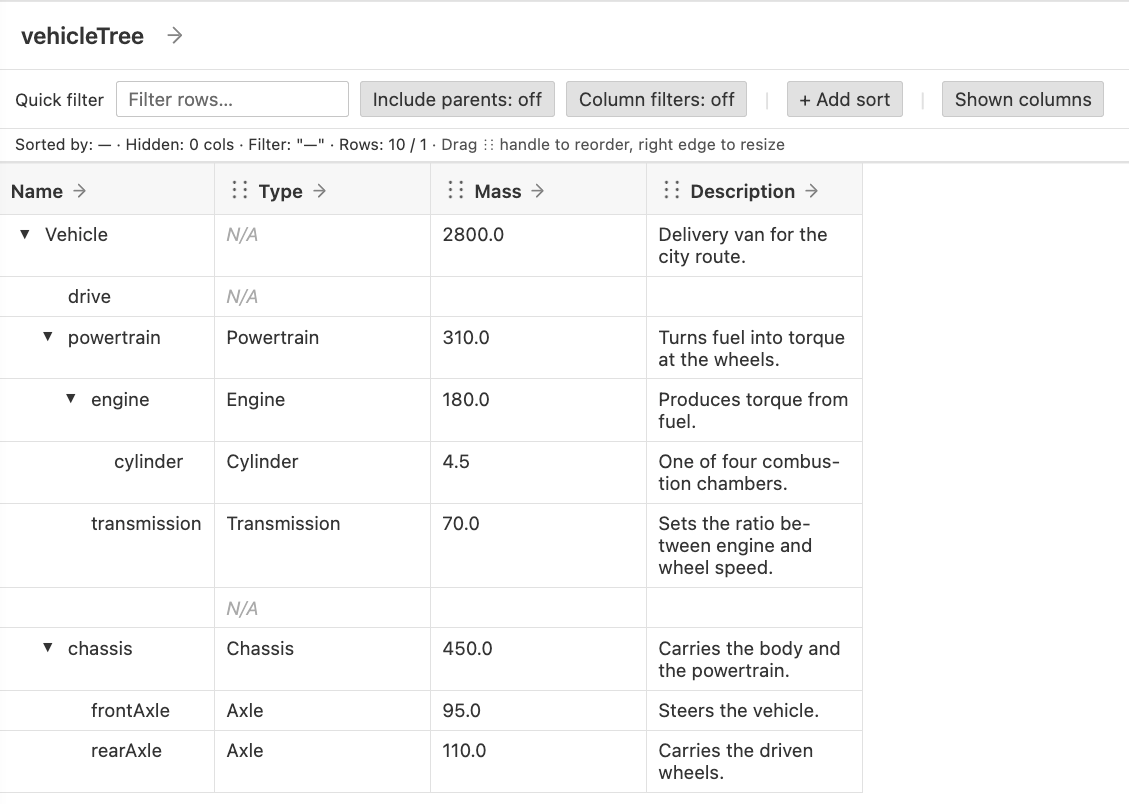
Every other feature the walk reaches is a row: parts, actions, requirements, items
and connections. Open vehicleTree now and expand its rows: the action drive and
the unnamed connection between engine and transmission sit among the parts:
To show only the structure, add a filter. In a hierarchical table the filter judges
every row, the top row included, and a row that fails is removed together with
everything beneath it. The filter therefore has to admit the kind of every row on the
path to the rows you want: here the part definition at the top, and the parts
beneath it. Add the filter next to the expose:
    view vehicleTree : TVD::HierarchicalTableView {
        expose VehicleModel::Vehicle::**;
        filter (hastype SysML::PartDefinition) or (hastype SysML::PartUsage);

        view Name :>> hierarchicalColumn {
            attribute :>> featureRepresentation :> ColRep::declaredName;
        }
        // Type, Mass and Description columns as above
    }
hastype matches one kind exactly, so the connection, which SysML treats as a more
specific kind of part usage, is removed along with the action. Leaving out the
PartDefinition term would remove Vehicle, and with it the whole tree.
A requirement nested in a part needs PartUsage admitted as well as
RequirementUsage, or the part is removed and the requirement with it.
Expand the tree when it opens
Rows start collapsed. To open the view with the whole tree expanded, set
defaultCollapse on the view:
    view vehicleTree : TVD::HierarchicalTableView {
        expose VehicleModel::Vehicle::**;
        filter (hastype SysML::PartDefinition) or (hastype SysML::PartUsage);
        attribute :>> defaultCollapse = false;

        view Name :>> hierarchicalColumn {
            attribute :>> featureRepresentation :> ColRep::declaredName;
        }
        // Type, Mass and Description columns as above
    }
Check the result
The complete view is:
package MyViews {
    private import SysideViews::*;

    view vehicleTree : TVD::HierarchicalTableView {
        expose VehicleModel::Vehicle::**;
        filter (hastype SysML::PartDefinition) or (hastype SysML::PartUsage);
        attribute :>> defaultCollapse = false;

        view Name :>> hierarchicalColumn {
            attribute :>> featureRepresentation :> ColRep::declaredName;
        }
        view Type :> columnViews {
            :>> columnFeature = DefinitionsFirst(baseViewElement);
            attribute :>> featureRepresentation :> ColRep::declaredName;
        }
        view Mass :> columnViews {
            :>> columnFeature = NamedUsage(
                baseViewElement,
                "mass",
                NameType::name,
                UsageKind::attributeUsage
            );
            attribute :>> featureRepresentation :> ColRep::featureValue;
        }
        view Description :> columnViews {
            attribute :>> featureRepresentation :> ColRep::documentation;
        }
    }
}
Open vehicleTree from the SysMLv2 Views panel. It
renders:
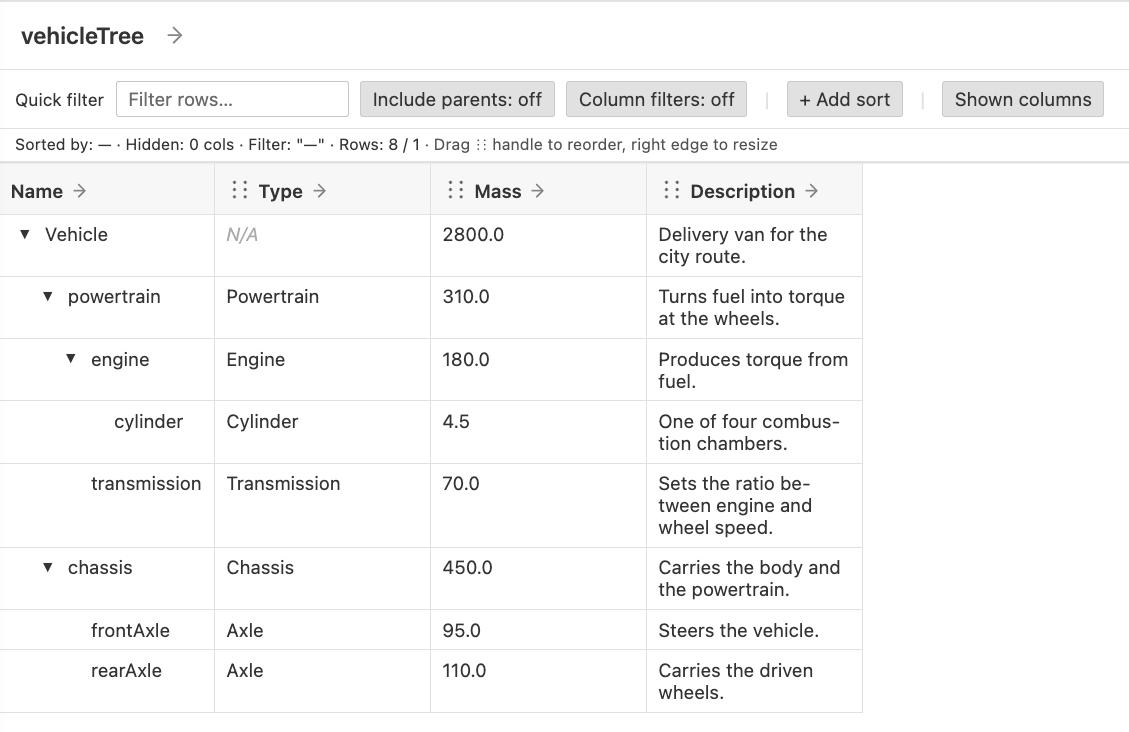
Mass cells are editable: changing a value writes it back to that row’s mass
attribute.
Show several trees in one table
A hierarchical table takes one expose, so it has one place to start. To show trees from several models side by side, declare a definition that holds a part typed by each one, and expose its members.
Say the van tows a trailer, designed separately in its own package, saved as
Trailer.sysml:
package TrailerModel {
    part def Trailer {
        part hitch : Hitch {
            doc /* Couples the trailer to the van. */
        }
        part axle : Axle {
            doc /* Carries the load. */
        }
    }

    part def Hitch;
    part def Axle;
}
Neither model needs to change. Declare the definition next to the view, where it exists only to give the table its starting point:
package MyViews {
    private import SysideViews::*;
    private import VehicleModel::Vehicle;
    private import TrailerModel::Trailer;

    part def Fleet {
        part van : Vehicle;
        part trailer : Trailer;
    }

    view fleetTree : TVD::HierarchicalTableView {
        expose Fleet::*::**;
        filter hastype SysML::PartUsage;

        view Name :>> hierarchicalColumn {
            attribute :>> featureRepresentation :> ColRep::declaredName;
        }
        view Type :> columnViews {
            :>> columnFeature = DefinitionsFirst(baseViewElement);
            attribute :>> featureRepresentation :> ColRep::declaredName;
        }
    }
}
Fleet::*::** makes each feature of Fleet a top row with its own tree beneath,
while Fleet itself is not a row. The top rows are parts, so the filter needs only
PartUsage, and Type has a value on every row:
Name              Type
───────────────────────────────
van               Vehicle
  powertrain      Powertrain
    engine        Engine
      cylinder    Cylinder
    transmission  Transmission
  chassis         Chassis
    frontAxle     Axle
    rearAxle      Axle
trailer           Trailer
  hitch           Hitch
  axle            Axle
Continue with Table views UI to filter, edit and add requirements in the tree, or see Troubleshoot grid views if the view stays empty or reports an error.