

Build a matrix view
This tutorial introduces matrix views in the Syside VS Code Extension by building one: a traceability matrix showing which system requirements of a delivery drone are derived from each stakeholder requirement. Each step introduces one concept briefly and links the page that explains it in depth.
The views below import the SysideViews library, which the SysMLv2 Views panel offers to add the first time you open it, so accept that prompt before writing a view.
To get started, copy and save this model as myMatrixView.sysml. It keeps
stakeholder and system requirements in separate packages, and records two
derivations between them as derivation connection definitions:
package ExampleModel {
    package StakeholderRequirements {
        requirement def <'STK-1'> DeliveryRange {
            doc /* The drone shall deliver parcels up to 10 km away. */
        }
        requirement def <'STK-2'> SafeOperation {
            doc /* The drone shall operate safely near people. */
        }
    }

    package SystemRequirements {
        requirement def <'SYS-1'> BatteryEndurance {
            doc /* The battery shall sustain 30 minutes of flight. */
        }
        requirement def <'SYS-2'> CruiseSpeed {
            doc /* The drone shall cruise at 60 km/h. */
        }
        requirement def <'SYS-3'> ObstacleDetection {
            doc /* The drone shall detect obstacles within 20 m. */
        }
    }

    package Derivations {
        private import RequirementDerivation::*;

        #derivation connection def {
            end #original : StakeholderRequirements::DeliveryRange;
            end #derive : SystemRequirements::BatteryEndurance;
        }
        #derivation connection def {
            end #original : StakeholderRequirements::DeliveryRange;
            end #derive : SystemRequirements::CruiseSpeed;
        }
    }
}
Each derivation tags its ends: #original marks the requirement derived from, and
#derive the requirement derived from it. The tags come from the
RequirementDerivation library, which the Derivations package imports.
SafeOperation has no derived requirement yet. The last step adds one from the
matrix itself.
In a real project, the stakeholder requirements, the system requirements, the
derivations and the views would often each sit in a file of their own. This tutorial
keeps them as packages in one file for simplicity. The views work the same either
way, since an expose names a package, not the file it is saved in.
Choose the rows and columns
A matrix has two axes, and each one selects its own elements: rowView and
columnView each select their elements with their own expose, the same way a table
selects its rows. Here the rows are the stakeholder requirements and the columns the
system requirements, each taken from its own package. MVD is the short name the
library declares for its matrix view definitions, which is why the view below is
typed MVD::MatrixView. Add this below the model, in the same file:
package MyViews {
    private import SysideViews::*;

    view requirementDerivation : MVD::MatrixView {
        view :>> rowView {
            expose ExampleModel::StakeholderRequirements::*;
        }
        view :>> columnView {
            expose ExampleModel::SystemRequirements::*;
        }
    }
}
Each package holds only the requirements an axis needs, so no filter is needed
here. An axis drawing from a package with mixed content narrows it with one (see
Narrowing the set with filter).
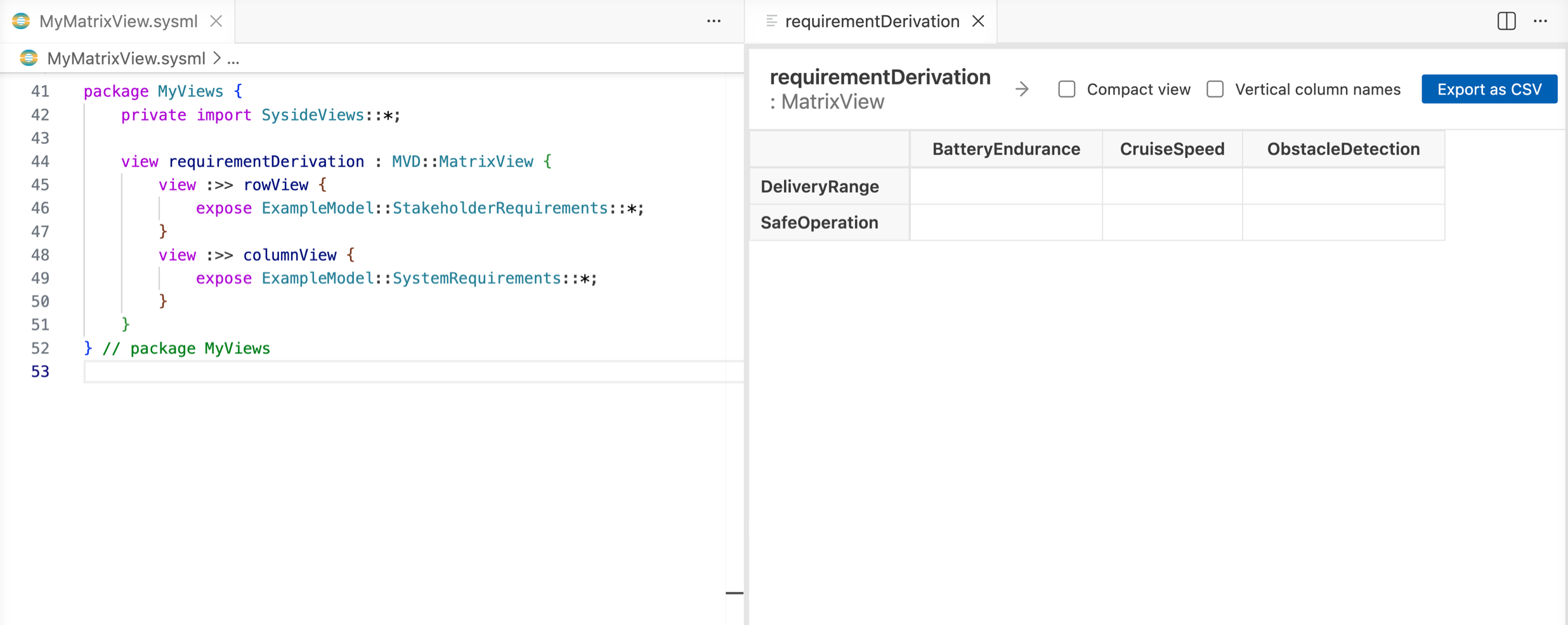
Open requirementDerivation from the SysMLv2 Views panel. The axes are in place, and
every cell is empty:
Mark the cells
The cells come from a third view, cellView, which exposes the relationships the
matrix reads. Add it after columnView:
package MyViews {
    private import SysideViews::*;

    view requirementDerivation : MVD::MatrixView {
        view :>> rowView {
            expose ExampleModel::StakeholderRequirements::*;
        }
        view :>> columnView {
            expose ExampleModel::SystemRequirements::*;
        }
        view :>> cellView {
            expose ExampleModel::Derivations::*;
        }
    }
}
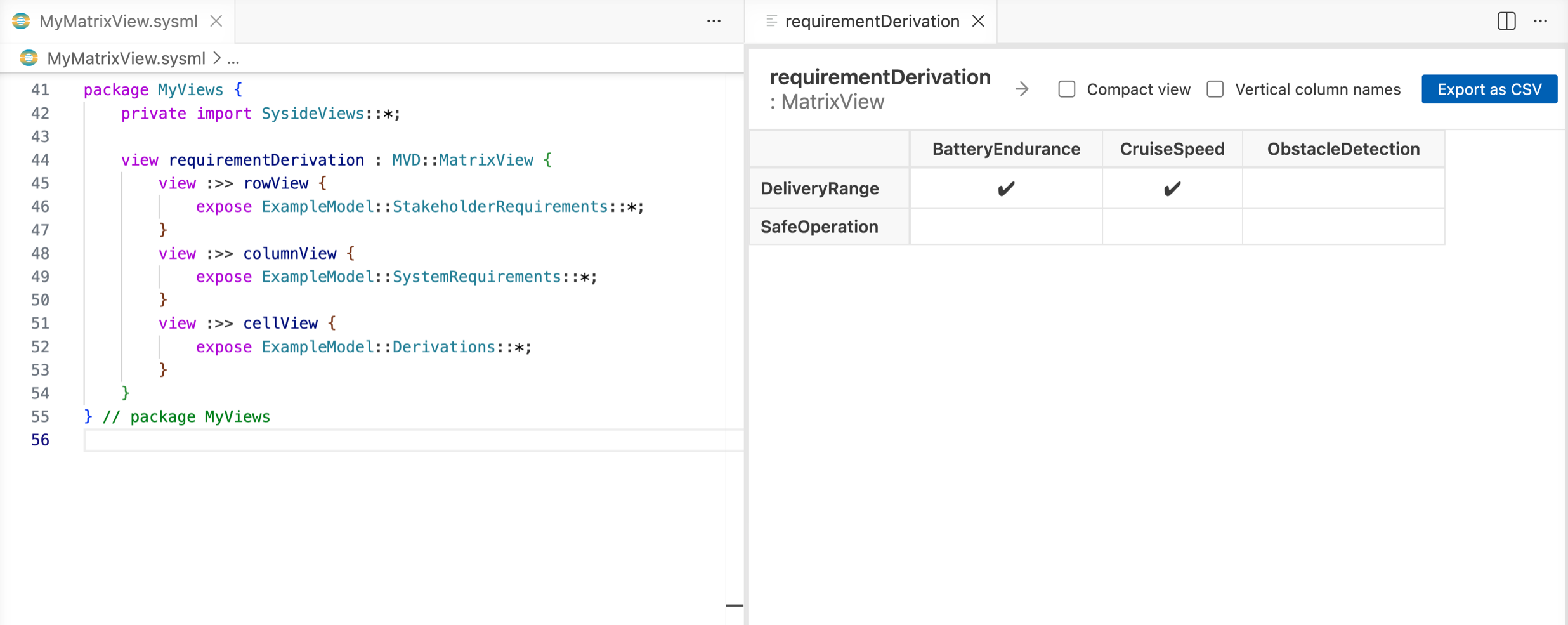
A derivation marks the cell where one of its ends is typed by the row requirement and the other by the column requirement (see Matrix view concepts). The two derivations now mark their cells:
Give the relationships a direction
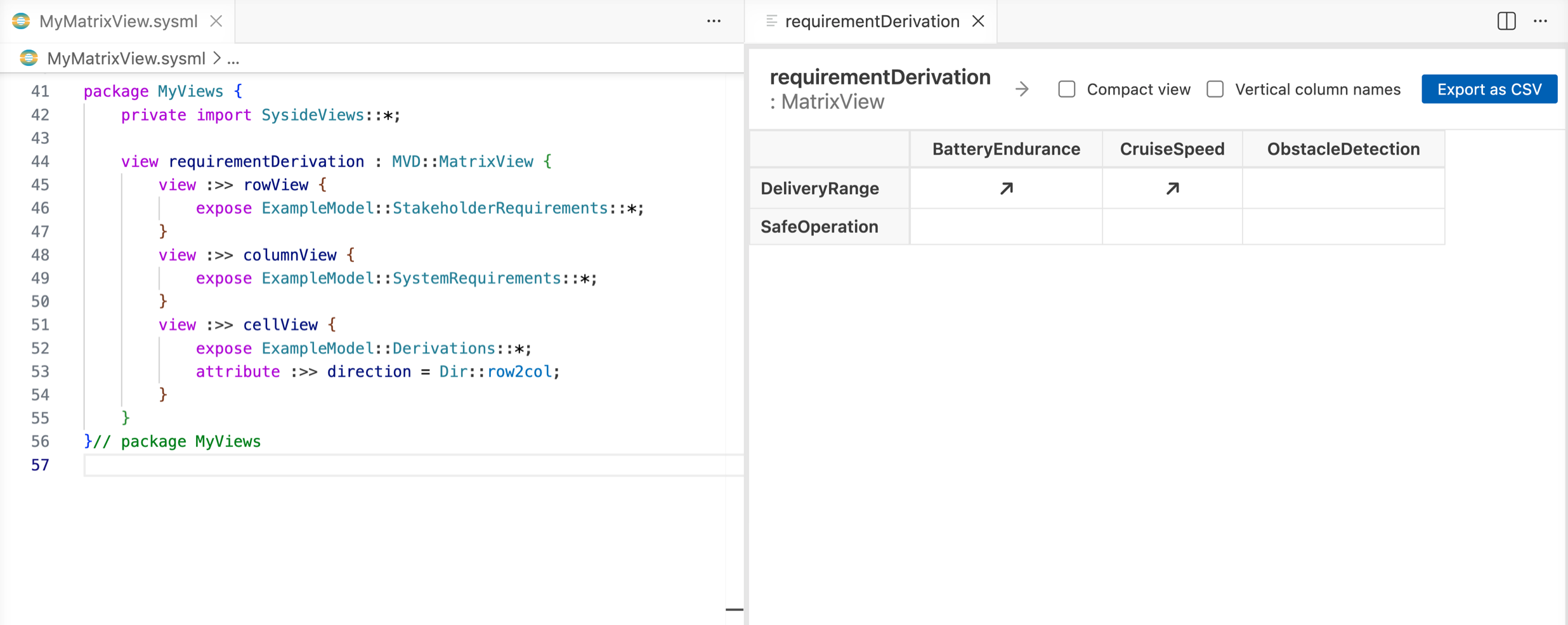
A derivation reads one way: a system requirement is derived from a stakeholder
requirement. By default a matrix ignores which end is which. Setting direction on
the cell view makes the matrix count only derivations whose original requirement is a
row and whose derived requirement is a column (see
Direction values):
package MyViews {
    private import SysideViews::*;

    view requirementDerivation : MVD::MatrixView {
        view :>> rowView {
            expose ExampleModel::StakeholderRequirements::*;
        }
        view :>> columnView {
            expose ExampleModel::SystemRequirements::*;
        }
        view :>> cellView {
            expose ExampleModel::Derivations::*;
            attribute :>> direction = Dir::row2col;
        }
    }
}
The same cells stay marked, now with an arrow:
Add a derivation from the matrix
A matrix can also write relationships into the model. Two changes make this one
editable, which gives the finished MyViews package:
package MyViews {
    private import SysideViews::*;

    view requirementDerivation : MVD::MatrixView {
        attribute :>> isEditable = true;

        view :>> rowView {
            expose ExampleModel::StakeholderRequirements::*;
        }
        view :>> columnView {
            expose ExampleModel::SystemRequirements::*;
        }
        view :>> cellView {
            expose ExampleModel::Derivations::*;
            filter (
                @ RequirementDerivation::derivation and
                as SysML::ConnectionDefinition hastype SysML::ConnectionDefinition
            );
            attribute :>> direction = Dir::row2col;
        }
    }
}
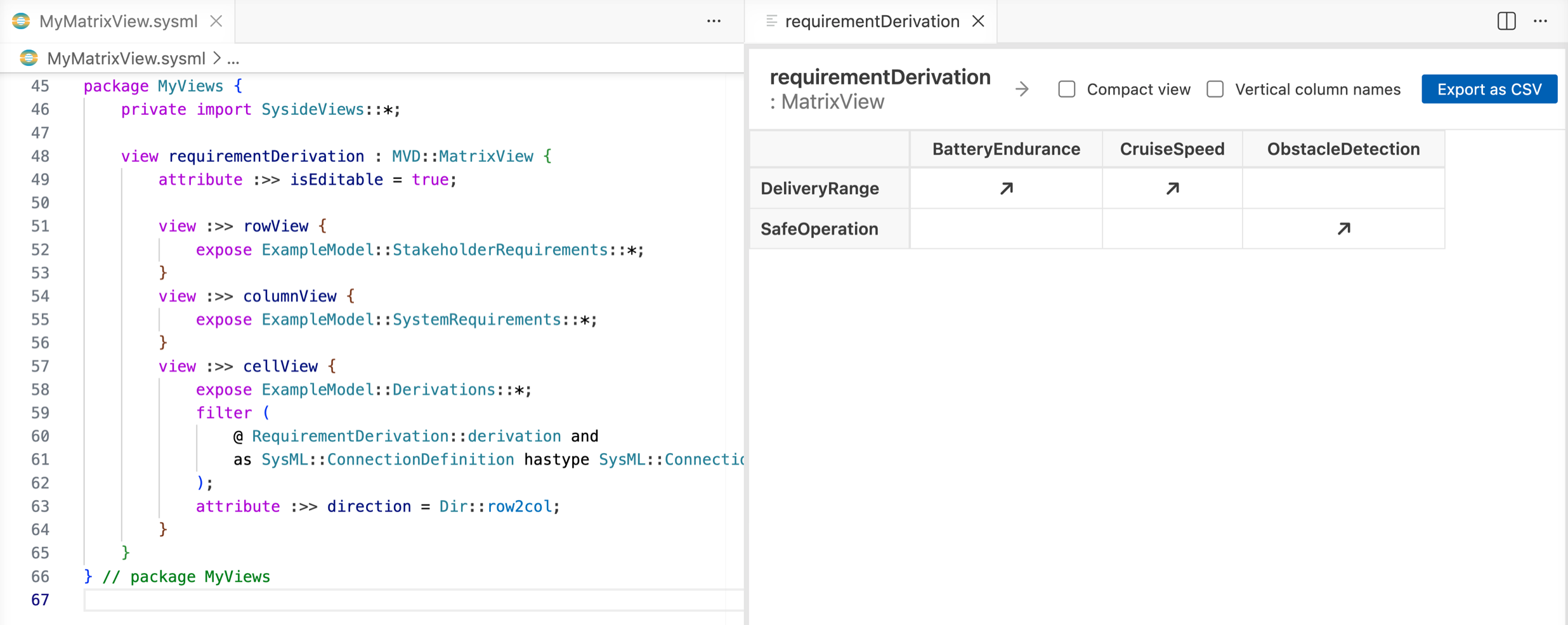
isEditable = trueturns editing on.The
filterstates what a new cell creates. An editable matrix needs a cell filter that admits exactly one kind of relationship. For a derivation definition that takes two conditions: the#derivationmetadata, and a connection definition rather than a connection between usages. The filter names the metadata by its qualified name, soMyViewsneeds no import for it.
New derivations are written into the package the cell view exposes, Derivations,
so the cell view reads them back the next time the matrix loads.
Save the file, since the matrix does not write while a file has unsaved
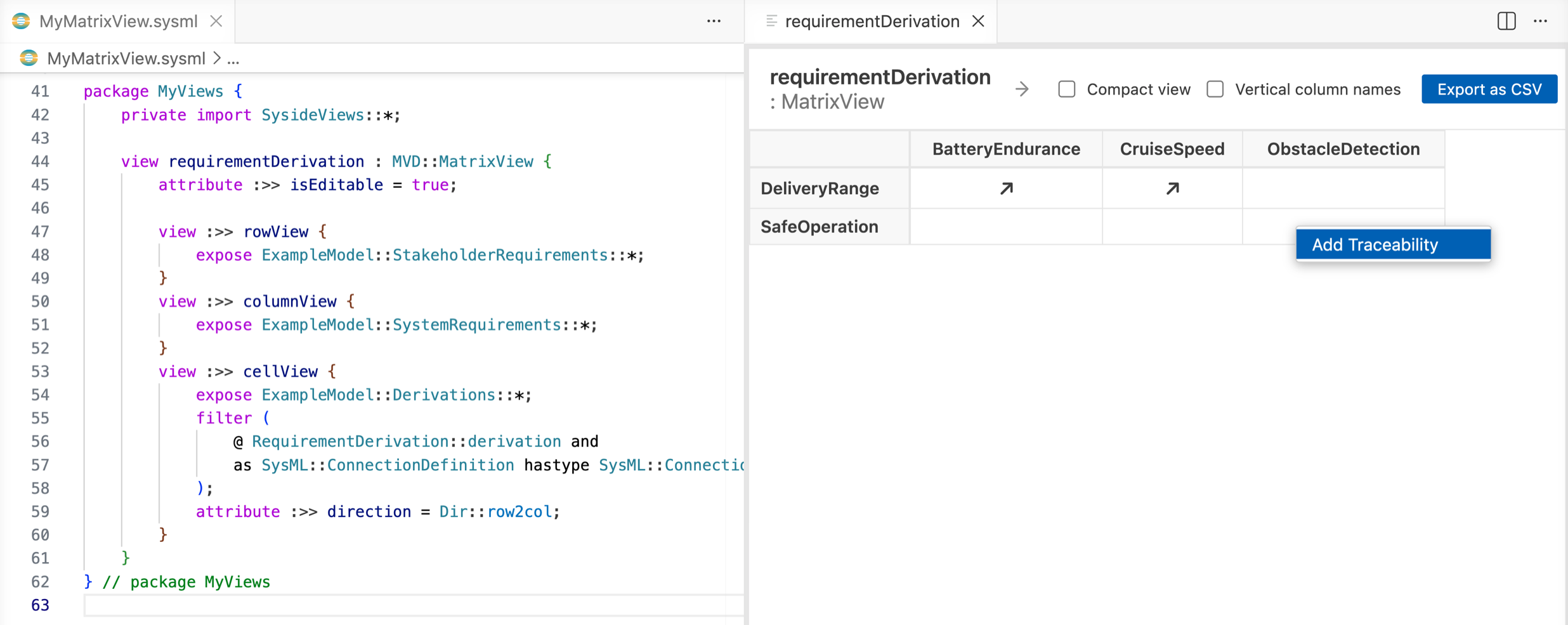
changes. Then right-click the empty SafeOperation × ObstacleDetection cell and
choose Add Traceability:
Because the matrix is directed, the derivation is written straight away: a derivation
connection definition in Derivations, with SafeOperation as its #original end
and ObstacleDetection as its #derive end. The cell is marked:
What’s next
To write connections or allocations instead, or to relate the usages inside a system rather than its definitions, continue with Make a matrix editable.
Matrix view concepts explains when a relationship marks a cell, and Matrix view structure lists every attribute a matrix accepts, such as showing requirement IDs instead of names in the headers.